I was assigned a task to create a Asp.Net Core Web API with swagger that supports Api Versioning for one of my recent projects. Well the task seems to be simple as decorating attributes on the methods seems to be working fine. But when I integrated the solution with Swagger its not working. In this article I will be showing you how we can develop a WebApi with Api Versioning that supports Swagger UI in .Net 6.0.
Sample Solution
I will create a sample solution with .Net 6.0 to showcase the issue. Lets create a ASP.Net Core Web Api project with OpenAPI support enabled. This will make the solution to run with Swagger UI documentation.
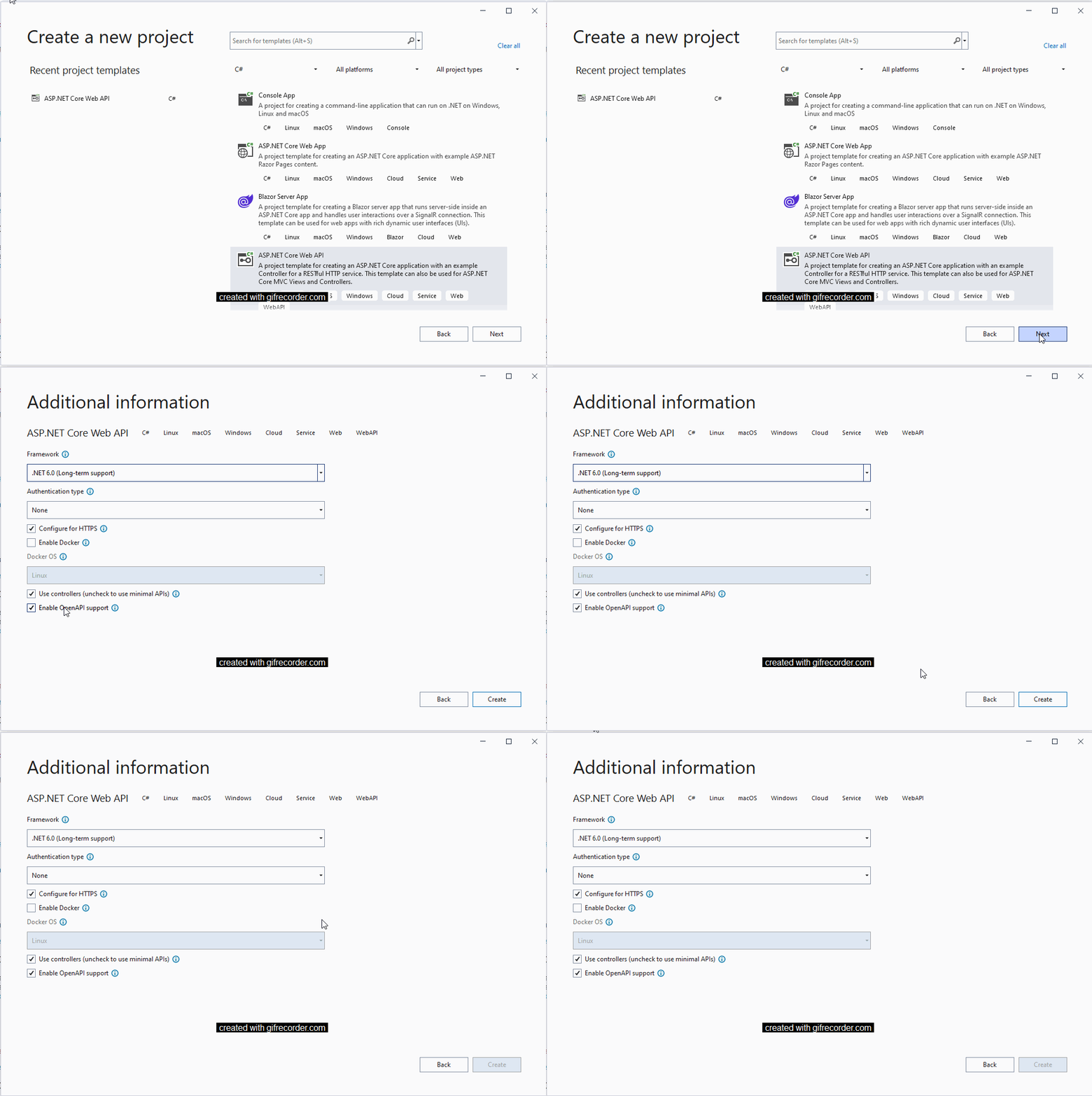
When you run the solution you will get the sample page below

Now we need to add the following assembles to enable versioning of the API’s namely
Microsoft.AspNetCore.Mvc.Versioning (Version 5.0.0) and
Microsoft.AspNetCore.Mvc.Versioning.ApiExplorer (Version 5.0.0)
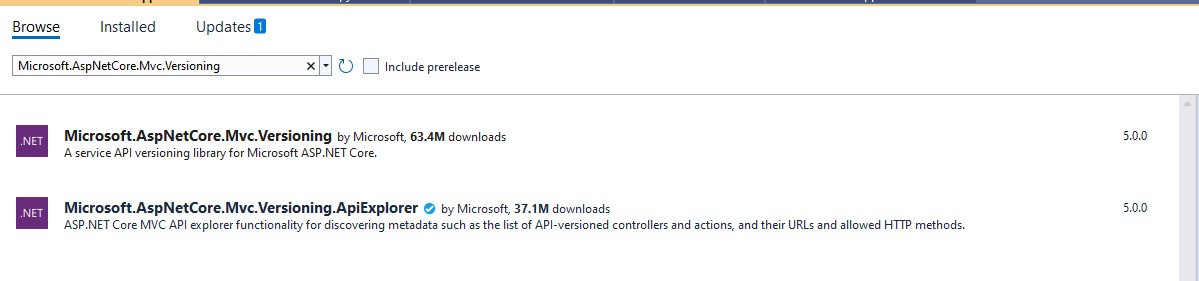
Now you will have the solution added with the packages as shown below.

Adding Swagger Extensions
Now we need to add some entension files to the solution that will have some configurations to add the solution with API versioning on the controllers. We will need to add 3 extension files to the solution namely AppBuilderExtensions.cs, ConfigureSwaggerOptions.cs and ServiceExtensions.cs file.
AppBuilderExtensions.cs
The extension file will have the code to iterate through the controllers with the version attributes defined and add it to the swagger UI as combo box.
public static class AppBuilderExtensions
{
    public static IApplicationBuilder UseSwaggerWithVersioning(this IApplicationBuilder app)
    {
        IServiceProvider services = app.ApplicationServices;
        var provider = services.GetRequiredService<IApiVersionDescriptionProvider>();

        app.UseSwagger();

        app.UseSwaggerUI(options =>
        {
            foreach (var description in provider.ApiVersionDescriptions)
            {
                options.SwaggerEndpoint($"/swagger/{description.GroupName}/swagger.json", $"Version - {description.GroupName.ToUpperInvariant()}");
            }
        });

        return app;
    }
}
ConfigureSwaggerOptions.cs
public class ConfigureSwaggerOptions : IConfigureNamedOptions<SwaggerGenOptions>
{
    private readonly IApiVersionDescriptionProvider provider;

    public ConfigureSwaggerOptions(IApiVersionDescriptionProvider provider)
    {
        this.provider = provider;
    }

    public void Configure(SwaggerGenOptions options)
    {
        // add swagger document for every API version discovered
        foreach (var description in provider.ApiVersionDescriptions)
        {
            options.SwaggerDoc(description.GroupName, CreateInfoForApiVersion(description));
        }
    }

    public void Configure(string name, SwaggerGenOptions options)
    {
        Configure(options);
    }

    private OpenApiInfo CreateInfoForApiVersion(ApiVersionDescription description)
    {
        var info = new OpenApiInfo()
        {
            Title = "WebApplication API",
            Version = description.ApiVersion.ToString()
        };

        if (description.IsDeprecated)
        {
            info.Description += " This API version has been deprecated.";
        }

        return info;
    }
}
ServiceExtensions.cs
public static class ServiceExtensions
{
    public static IServiceCollection AddCore(this IServiceCollection services)
    {
        return services.AddVersioning()
            .AddSwaggerVersioning();
    }

    private static IServiceCollection AddVersioning(this IServiceCollection services)
    {
        services.AddApiVersioning(setup =>
        {
            setup.DefaultApiVersion = new ApiVersion(1, 0);
            setup.AssumeDefaultVersionWhenUnspecified = true;
            setup.ReportApiVersions = true;
        });

        services.AddVersionedApiExplorer(setup =>
        {
            setup.GroupNameFormat = "'v'VVV";
            setup.SubstituteApiVersionInUrl = true;
        });

        return services;
    }

    private static IServiceCollection AddSwaggerVersioning(this IServiceCollection services)
    {
        services.AddSwaggerGen(options => {
            // for further customization
            //options.OperationFilter<DefaultValuesFilter>();
        });
        services.ConfigureOptions<ConfigureSwaggerOptions>();

        return services;
    }
}
Changes to the Program.cs file
In the program.cs file replace the text after the using statements as below
var builder = WebApplication.CreateBuilder(args);
{
    // Add Core
    builder.Services.AddCore();

    builder.Services.AddControllers();

    var app = builder.Build();

    if (app.Environment.IsDevelopment())
    {
        app.UseDeveloperExceptionPage();
    }

    app.UseHttpsRedirection();

    app.UseRouting();

    // Core
    app.UseSwaggerWithVersioning();

    app.UseAuthorization();

    app.UseEndpoints(endpoints =>
    {
        endpoints.MapControllers();
    });

    app.Run();
}
Now when you run the application you will see the version in the combo box and the respective Web API version calls will be listed based on the version selcted in the combo box.
Adding Controllers with API Version
WeatherForecaseController.cs
In the default WeatherForecaseController class please replace it with the following code block
[ApiController]
[ApiVersion("1.0")]
[Route("api/v{version:apiVersion}/[controller]")]
public class WeatherForecastController : ControllerBase
{
    private static readonly string[] Summaries = new[]
    {
    "Freezing", "Bracing", "Chilly", "Cool", "Mild", "Warm", "Balmy", "Hot", "Sweltering", "Scorching"
};

    private readonly ILogger<WeatherForecastController> _logger;

    public WeatherForecastController(ILogger<WeatherForecastController> logger)
    {
        _logger = logger;
    }

    [MapToApiVersion("1.0")]
    [HttpGet("getweatherforcast", Name = "GetWeatherForecast")]
    public IEnumerable<WeatherForecast> Get()
    {
        return Enumerable.Range(1, 5).Select(index => new WeatherForecast
        {
            Date = DateTime.Now.AddDays(index),
            TemperatureC = Random.Shared.Next(-20, 55),
            Summary = Summaries[Random.Shared.Next(Summaries.Length)]
        })
        .ToArray();
    }
}
WeatherForecast2Controller.cs
Now create a new controller class called WeatherForecast2Controller.cs and replace the class with the following code snippet.
[ApiController]
[ApiVersion("2.0")]
[Route("api/v{version:apiVersion}/[controller]")]
public class WeatherForecast2Controller : ControllerBase
{
    private static readonly string[] Summaries = new[]
    {
    "Freezing", "Bracing", "Chilly", "Cool", "Mild", "Warm", "Balmy", "Hot", "Sweltering", "Scorching"
};

    private readonly ILogger<WeatherForecast2Controller> _logger;

    public WeatherForecast2Controller(ILogger<WeatherForecast2Controller> logger)
    {
        _logger = logger;
    }

    [MapToApiVersion("2.0")]
    [HttpGet("getweatherforcast", Name = "GetWeatherForecast2")]
    public IEnumerable<WeatherForecast> Get()
    {
        return Enumerable.Range(1, 5).Select(index => new WeatherForecast
        {
            Date = DateTime.Now.AddDays(index),
            TemperatureC = Random.Shared.Next(-20, 55),
            Summary = Summaries[Random.Shared.Next(Summaries.Length)]
        })
        .ToArray();
    }
}
Now run the project and you can see the Swagger UI now has a combo box with Version – X, selecting on the version it will display the respective Web API versions in the body of the page.
The code is an improvisation of the Asp.Net Web API version samples found in the Github here. This code was pretty much old and when I was developing a Web API project I modified it to the .Net Core 6.0 version. Until my next blog, happy coding !!!
 dotnetjaikum.com