Introduction
In the fast-paced world of software development, agility and efficiency are paramount. Imagine a scenario where your development team is constantly bogged down by the need to redeploy Logic Apps every time there is a change in Azure Key Vault secrets. This blog will take you through a journey of overcoming this bottleneck by leveraging Azure API Management (APIM) Named Values to retrieve Key Vault values without the need for redeployment. Let’s dive into the problem, explore various solutions, and unveil a streamlined approach that will save your team time and effort.
Problem Description
Picture this: Your team is working on a project that requires frequent updates to configuration settings stored in Azure Key Vault. Every time a secret is updated, the Logic App needs to be redeployed to fetch the latest values. This process is not only time-consuming but also disrupts the development workflow, leading to frustration and inefficiency.
Example Use Case
Consider a partner system that requires the creation of a sandbox environment every week. The credentials for this environment change regularly. Since the secrets are stored in Key Vault, any change necessitates redeploying the Logic App to fetch the updated values. This frequent redeployment creates an overhead for the development team, causing delays and increasing the risk of errors.
Existing System Limitation
The primary limitation of the existing system is the need to redeploy the Logic App whenever there is a change in the Key Vault secrets. This process is time-consuming and can disrupt the development workflow, making it difficult to keep up with frequent configuration changes.
Different Solution Approaches
Approach 1: Directly Calling Key Vault Action in Logic App
Imagine a scenario where you decide to call the Key Vault action GetSecret directly within the Logic App to retrieve the updated values. At first glance, this seems like a straightforward solution. However, as you delve deeper, you realize that this method has its drawbacks:
- Speed Bumps: It takes almost 1 second to retrieve the values, which can add up quickly if you have multiple secrets to fetch.
- Secret Retrieval Limitation: There is no way to retrieve multiple secrets in a single call. For example, retrieving two secrets would require five hits in the Logic App, leading to inefficiencies and potential performance issues.
Approach 2: Creating a Custom REST Service
Next, you consider creating a REST service that retrieves the Key Vault secrets. This service can be hosted separately and can retrieve multiple secrets in one API call. While this approach offers some flexibility, it comes with its own set of challenges:
- Cost Considerations: Hosting and maintaining a separate REST service can incur additional costs.
- Development Effort: Building and integrating the REST service requires significant development effort.
- Maintenance Overhead: Keeping the REST service up-to-date and ensuring its reliability adds to the maintenance burden.
Approach 3: Using APIM Named Values
The third approach involves using APIM Named Values to retrieve values from Key Vault. Named Values in APIM can be configured to fetch values from Key Vault. This approach offers several advantages:
- Blazing Fast: It is faster compared to other approaches, ensuring quick retrieval of secrets.
- Multi-Secret Retrieval: It can handle retrieving multiple values from Key Vault in a single API call, making it highly efficient.
- Seamless Updates: Changes to the Key Vault secrets can be updated in the Named Values using the “Fetch Key Vault Secret” context menu, eliminating the need for redeployment.
Proposed Solution: Using APIM Named Values
Benefits of the Proposed Solution
- Performance: The proposed solution significantly outperforms other methods, ensuring rapid retrieval of secrets from the Key Vault.
- High Efficiency: Capable of handling multiple secret retrievals in a single API call, this approach maximizes efficiency and minimizes latency.
- Seamless Updates: Say goodbye to redeployment headaches! Changes to Key Vault secrets can be effortlessly updated in Named Values using the “Fetch Key Vault Secret” context menu, streamlining the update process.
- Reduced Development Overhead: By eliminating the need for frequent redeployments, this solution frees up valuable development time, allowing your team to focus on more critical tasks.
- Enhanced Reliability: With fewer moving parts and a more streamlined process, the proposed solution enhances the overall reliability and stability of your application.
Steps for Implementing the Proposed Solution
Create Named Values in APIM
- Navigate to the Azure APIM instance.
- Go to the “Named Values” section.
- Create a new Named Value and configure it to fetch the secret from Azure Key Vault.


Configure the GET Method
- Create a new API in APIM.
- Define a GET method that will retrieve the values from the Named Values configured in the previous step.
- Important Settings
- Setting the <set-header> policy inside <return-response>. If this <set-header> policy is not set then when you call the method in Logic App you will get the response content type as “application/octet-stream“
- Again <set-header> has a sequence when declaring, you should declare the header policy before <set-body>. The sequence is as below
<return-response>
<set-status …>
<set-header>
…
</set-header>
<set-body …>
…
</set-body>
</return-response>

Update Named Values
- Use the “Fetch Key Vault Secret” context menu to update the Named Values whenever there is a change in the Key Vault secrets.

Test the API
Calling from Logic App
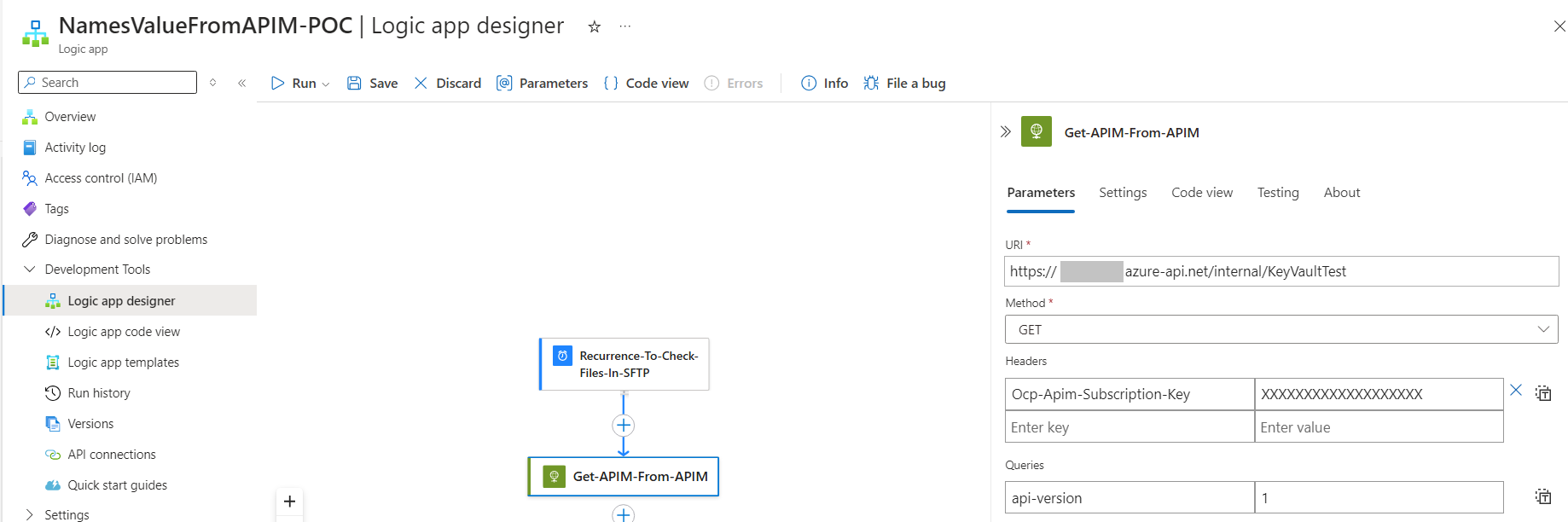
There are 2 ways of calling a APIM endpoint in Logic App one is it to use the APIM Action and another one is by using Http Action. I will be using the Http Action here. After configuring as below you will get the response from APIM (<0.25 MS)
Calling APIM Named Values Get method from Logic App with Http Trigger

Calling APIM Named Values Get method from Logic App with Scheduled Trigger
Sending the Values in the Request Body from APIM
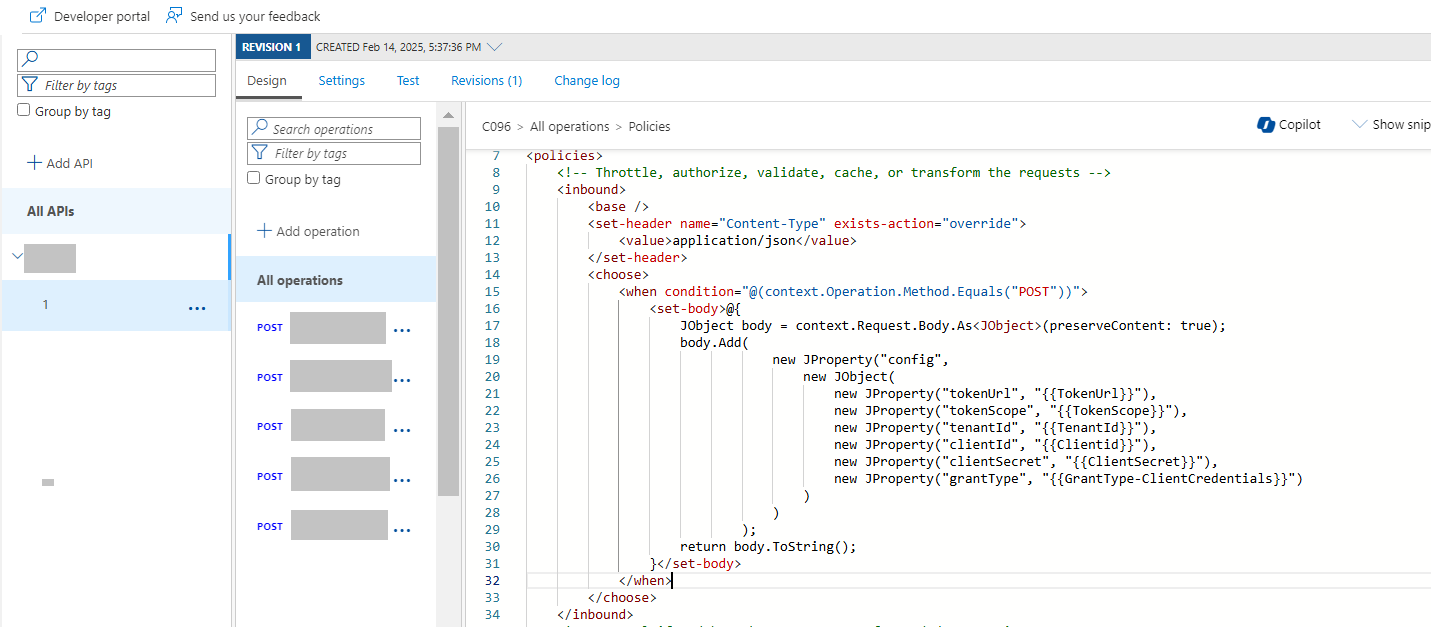
This approach can be used when you have a Http Trigger and want to send some values from KeyVault like Client ID, Client Secret, Tocken Scope. You can add a <set-body> policy to achieve this. You can add this below implemention specific to API method or on AllOperations in APIM. Below code provides the details on add the <set-body> policy in AllOperation. Please note that this approach will add the named values to the Body so that request will be intact. In the below example <set-body> uses JProperty to set the elements of the JSON it uses the named values TokenUrl, TokenScope, TenantId, ClientId, ClientSecret and GrantType-ClientCredentials to set the values.
By following these steps, you can efficiently use APIM Named Values to retrieve Key Vault values in Logic Apps without the need for redeployment. This approach eliminates the need for frequent redeployments of Logic Apps, thereby streamlining the development process.
Conclusion
In this blog, we discussed the challenges of using Azure Key Vault in Logic Apps and the need for redeployment whenever there is a change in Key Vault secrets. We explored different solution approaches and proposed a solution that involves using APIM Named Values. This solution offers significant benefits in terms of speed, efficiency, and ease of updates, making it an ideal choice for scenarios with frequent configuration changes.
 dotnetjaikum.com