Optimizing Azure Logic Apps for Better Exception Handling

Author: Jayakumar SrinivasanDate: 02-Dec-2024

Overview of the Problem

Introduction

Developing complex logic apps that interact with multiple external API, databases, FTP servers, etc., often presents significant challenges in exception handling. This complexity is exacerbated when processing within loops. Such logic apps are notoriously difficult to troubleshoot, requiring a detailed examination of the run history to identify failures. Additionally, during my reviews, I have observed that these logic apps frequently send generic error messages with irrelevant status codes when exceptions occur.

A sample complexity

In my reviews, I frequently encounter logic apps performing following tasks: retrieve all files from an SFTP folder, obtain a token from an Authentication API, call an external system with the token, parse the data of each file in a loop, send the parsed data to another API, make database entries, move the file to different SFTP folders based on processing success or failure, and exit the logic app with a response or Terminate action. The developers often declare very few scopes to manage exceptions, resulting in generic “Internal Server Error” messages. Consequently, the development team must examine the run history to pinpoint the failure.


Complexity Root Cause

Analysis

When developing complex logic apps, it is crucial to handle exceptions at critical points, such as API calls, file processing, database interactions, and JSON parsing from external systems. Common issues identified in my reviews include:

  • Unrecognized system complexity at the start of development
  • Inadequate complexity assessment during design
  • Insufficient development time
  • Excessive use of connectors
  • Uncertainty in managing exceptions within control loops

Proposed Solution

Solution Description

The proposed solution leverages the default capabilities of logic apps to avoid complexity. It involves using two variables: a string variable to capture error messages from various actions and a Boolean variable to indicate exceptions in the workflow. The key aspect of this solution is defining scopes for every complex external or built-in connector. Consider creating separate logic apps to overcome action nesting depth limitations.

By defining scopes at each connector allows for capturing exceptions specific to an operation. The string variable will append exceptions from various connectors, enabling the storing precise error messages related to specific operations. The Boolean variable flag will be set false denoting exceptions in the workflow. The string variable is particularly useful for control connectors, as it helps identify failed items within loops by summarizing the failures (e.g., out of 5 items, 1 failed) with appropriate exception messages.

Key Considerations Before Development

  • Clear requirements for development
  • Involvement of built-in and custom connectors
  • Possibility of separating workflows into child logic apps
  • Fixed request and response schemas for external systems

Benefits

Following will be the benefits of the proposed solution

  • Precise identification of exceptions
  • Context-specific exception messages
  • Summary of exceptions when using control (loop) connectors
  • Decision-making facilitation at the end of the workflow to determine logic app success or failure
  • Simplified troubleshooting

References


How to version ASP.Net Core Web API with .Net 6.0 and Swagger

I was assigned a task to create a Asp.Net Core Web API with swagger that supports Api Versioning for one of my recent projects. Well the task seems to be simple as decorating attributes on the methods seems to be working fine. But when I integrated the solution with Swagger its not working. In this article I will be showing you how we can develop a WebApi with Api Versioning that supports Swagger UI in .Net 6.0.

Sample Solution

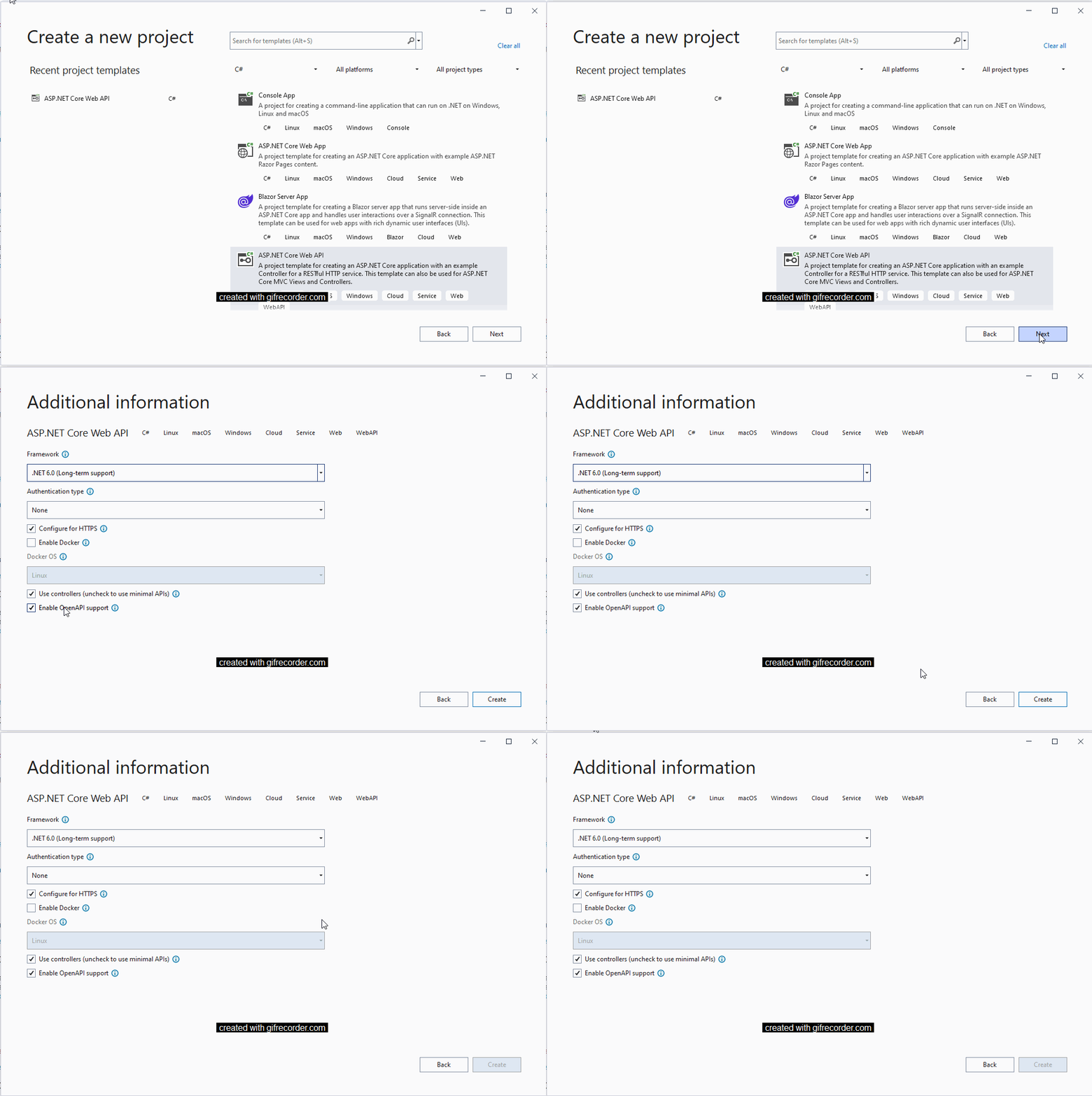
I will create a sample solution with .Net 6.0 to showcase the issue. Lets create a ASP.Net Core Web Api project with OpenAPI support enabled. This will make the solution to run with Swagger UI documentation.

When you run the solution you will get the sample page below

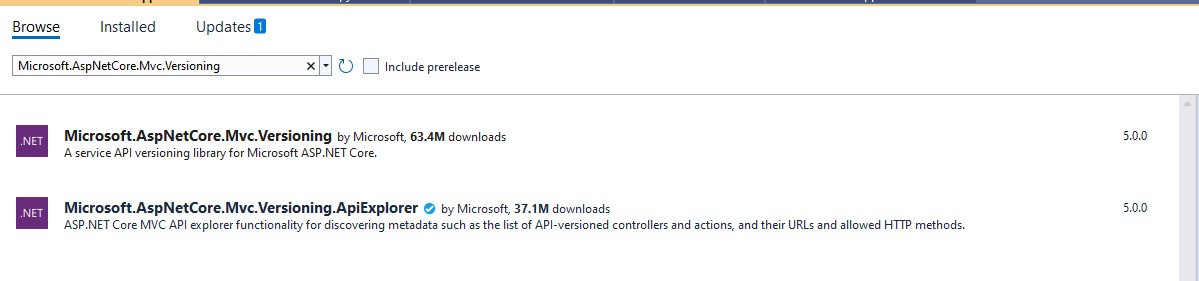
Now we need to add the following assembles to enable versioning of the API’s namely
Microsoft.AspNetCore.Mvc.Versioning (Version 5.0.0) and
Microsoft.AspNetCore.Mvc.Versioning.ApiExplorer (Version 5.0.0)

Nuget Package manager screen

Now you will have the solution added with the packages as shown below.

Solution Dependencies

Adding Swagger Extensions

Now we need to add some entension files to the solution that will have some configurations to add the solution with API versioning on the controllers. We will need to add 3 extension files to the solution namely AppBuilderExtensions.cs, ConfigureSwaggerOptions.cs and ServiceExtensions.cs file.

AppBuilderExtensions.cs

The extension file will have the code to iterate through the controllers with the version attributes defined and add it to the swagger UI as combo box.

public static class AppBuilderExtensions
{
    public static IApplicationBuilder UseSwaggerWithVersioning(this IApplicationBuilder app)
    {
        IServiceProvider services = app.ApplicationServices;
        var provider = services.GetRequiredService<IApiVersionDescriptionProvider>();

        app.UseSwagger();

        app.UseSwaggerUI(options =>
        {
            foreach (var description in provider.ApiVersionDescriptions)
            {
                options.SwaggerEndpoint($"/swagger/{description.GroupName}/swagger.json", $"Version - {description.GroupName.ToUpperInvariant()}");
            }
        });

        return app;
    }
}

ConfigureSwaggerOptions.cs

public class ConfigureSwaggerOptions : IConfigureNamedOptions<SwaggerGenOptions>
{
    private readonly IApiVersionDescriptionProvider provider;

    public ConfigureSwaggerOptions(IApiVersionDescriptionProvider provider)
    {
        this.provider = provider;
    }

    public void Configure(SwaggerGenOptions options)
    {
        // add swagger document for every API version discovered
        foreach (var description in provider.ApiVersionDescriptions)
        {
            options.SwaggerDoc(description.GroupName, CreateInfoForApiVersion(description));
        }
    }

    public void Configure(string name, SwaggerGenOptions options)
    {
        Configure(options);
    }

    private OpenApiInfo CreateInfoForApiVersion(ApiVersionDescription description)
    {
        var info = new OpenApiInfo()
        {
            Title = "WebApplication API",
            Version = description.ApiVersion.ToString()
        };

        if (description.IsDeprecated)
        {
            info.Description += " This API version has been deprecated.";
        }

        return info;
    }
}

ServiceExtensions.cs

public static class ServiceExtensions
{
    public static IServiceCollection AddCore(this IServiceCollection services)
    {
        return services.AddVersioning()
            .AddSwaggerVersioning();
    }

    private static IServiceCollection AddVersioning(this IServiceCollection services)
    {
        services.AddApiVersioning(setup =>
        {
            setup.DefaultApiVersion = new ApiVersion(1, 0);
            setup.AssumeDefaultVersionWhenUnspecified = true;
            setup.ReportApiVersions = true;
        });

        services.AddVersionedApiExplorer(setup =>
        {
            setup.GroupNameFormat = "'v'VVV";
            setup.SubstituteApiVersionInUrl = true;
        });

        return services;
    }

    private static IServiceCollection AddSwaggerVersioning(this IServiceCollection services)
    {
        services.AddSwaggerGen(options => {
            // for further customization
            //options.OperationFilter<DefaultValuesFilter>();
        });
        services.ConfigureOptions<ConfigureSwaggerOptions>();

        return services;
    }
}

Changes to the Program.cs file

In the program.cs file replace the text after the using statements as below

var builder = WebApplication.CreateBuilder(args);
{
    // Add Core 
    builder.Services.AddCore();

    builder.Services.AddControllers();

    var app = builder.Build();

    if (app.Environment.IsDevelopment())
    {
        app.UseDeveloperExceptionPage();
    }

    app.UseHttpsRedirection();

    app.UseRouting();

    // Core
    app.UseSwaggerWithVersioning();

    app.UseAuthorization();

    app.UseEndpoints(endpoints =>
    {
        endpoints.MapControllers();
    });

    app.Run();
}

Now when you run the application you will see the version in the combo box and the respective Web API version calls will be listed based on the version selcted in the combo box.

Adding Controllers with API Version

WeatherForecaseController.cs

In the default WeatherForecaseController class please replace it with the following code block

[ApiController]    
[ApiVersion("1.0")]    
[Route("api/v{version:apiVersion}/[controller]")]
public class WeatherForecastController : ControllerBase
{
    private static readonly string[] Summaries = new[]
    {
    "Freezing", "Bracing", "Chilly", "Cool", "Mild", "Warm", "Balmy", "Hot", "Sweltering", "Scorching"
};

    private readonly ILogger<WeatherForecastController> _logger;

    public WeatherForecastController(ILogger<WeatherForecastController> logger)
    {
        _logger = logger;
    }

    [MapToApiVersion("1.0")]
    [HttpGet("getweatherforcast", Name = "GetWeatherForecast")]
    public IEnumerable<WeatherForecast> Get()
    {
        return Enumerable.Range(1, 5).Select(index => new WeatherForecast
        {
            Date = DateTime.Now.AddDays(index),
            TemperatureC = Random.Shared.Next(-20, 55),
            Summary = Summaries[Random.Shared.Next(Summaries.Length)]
        })
        .ToArray();
    }
}

WeatherForecast2Controller.cs

Now create a new controller class called WeatherForecast2Controller.cs and replace the class with the following code snippet.

[ApiController]
[ApiVersion("2.0")]
[Route("api/v{version:apiVersion}/[controller]")]
public class WeatherForecast2Controller : ControllerBase
{
    private static readonly string[] Summaries = new[]
    {
    "Freezing", "Bracing", "Chilly", "Cool", "Mild", "Warm", "Balmy", "Hot", "Sweltering", "Scorching"
};

    private readonly ILogger<WeatherForecast2Controller> _logger;

    public WeatherForecast2Controller(ILogger<WeatherForecast2Controller> logger)
    {
        _logger = logger;
    }

    [MapToApiVersion("2.0")]
    [HttpGet("getweatherforcast", Name = "GetWeatherForecast2")]
    public IEnumerable<WeatherForecast> Get()
    {
        return Enumerable.Range(1, 5).Select(index => new WeatherForecast
        {
            Date = DateTime.Now.AddDays(index),
            TemperatureC = Random.Shared.Next(-20, 55),
            Summary = Summaries[Random.Shared.Next(Summaries.Length)]
        })
        .ToArray();
    }
}

Now run the project and you can see the Swagger UI now has a combo box with Version – X, selecting on the version it will display the respective Web API versions in the body of the page.

The code is an improvisation of the Asp.Net Web API version samples found in the Github here. This code was pretty much old and when I was developing a Web API project I modified it to the .Net Core 6.0 version. Until my next blog, happy coding !!!

Using TypeScript generated JavaScript in HTML and populating data

This is the continuation to my Creating AngularJS service and controller for Products blog and in this blog we will be looking at wiring the ProductService and ProductController to HTML. I have not used any complex AngularJS directives here I am bingding the products array that we retrieve from ProductService in to a table by using ng-repeat directive. Here is the code in the HTML file.

<html>   
    <script src="node_modules/angular/angular.js"></script> 
    <script src="node_modules/angular-ui-grid/ui-grid.js"></script>
    <script src="node_modules/jquery/dist/jquery.js"></script>     
     <script src="HelloWorld.js"></script>
     <script src="app/Models/Products/Product.js"></script>
     <script src="app/Service/Products/ProductsRepository.js"></script>
     <script src="app/Controllers/Products/productController.js"></script>
     <script src="app/app.js"></script>     
    <body ng-app="jaysmodule">                
        <input type="button" onclick="SayHello();" value="Hello" />               
        {{30+60}}
        <div ng-controller="ProductsController">
            <div>  
                <labl><b> Sample Demo to NG Grid</b></labl>  
            </div>  
            <table>
                <thead>
                    <tr>
                        <th class="productid">Product ID</th>
                        <th class="productname">Product Name</th>
                        <th class="productcode">Product Code</th>
                        <th class="price">Price</th>
                        <th class="productdecription">Description</th>
                    </tr>
                </thead>
                <tbody>
                    <tr ng-repeat="item in Products">
                        <td><input type="text" ng-disabled="saving" title="ID" ng-model="item.ProductId" ng-model-options="{updateOn:'blur'}" /></td>
                        <td><input type="text" ng-disabled="saving" title="ProductName" ng-model="item.ProductName" ng-model-options="{updateOn:'blur'}" /></td>
                        <td><input type="text" ng-disabled="saving" title="ProductCode" ng-model="item.ProductCode" ng-model-options="{updateOn:'blur'}" /></td>
                        <td><input type="text" ng-disabled="saving" title="ProductPrice" ng-model="item.Price" ng-model-options="{updateOn:'blur'}" /></td>
                        <td><input type="text" ng-disabled="saving" title="ProductDescription" ng-model="item.Description" ng-model-options="{updateOn:'blur'}" /></td>
                    </tr>
                </tbody>
            </table>
        </div>
    </body>
</html>

The html output will be as below.
Products_Html

Creating AngularJS service and controller for Products

In this blog we will see how we create a instance of ProductController in the App.ts file, this will be the starting point in the VSCode / Visual Studio code for initializing AngularJS module, services, models and controllers.

The following is the code that initializes the AngularJS module with instance to ProductService and ProductController.

module app {
    angular.module("jaysmodule",['ui.grid'])
    .service("productService", ["$q",
                function ($q) {
                    return new app.Service.Products.ProductService($q, "Static");
                }])
}

Let’s me explain how the instance of ProductService is created now. The following is the code for creating service

module app {
    angular.module("jaysmodule",['ui.grid'])
    .service("productService", ["$q",
                function ($q) {
                    return new app.Service.Products.ProductService($q, "Static");
                }])
}

If you have identified, the ProductService constructor code that we discussed this requires 2 parameters namely

  • $q: ng.IQService – This AngularJS service is used to have the Asynchronous implementation, this sevice provides implementation for deferred, resolve and reject that will come handy when you call a external service.
  • repoType: string – If you have noticed, ProductService extends ProductRepositoryManager which is responsible for creating instance of the repository service based on the string parameter passed, when you pass “Static” it creates instance of the ProductStaticRepository and when “Service” is passed it creates instance of ProductServiceRepository.
  • While creating instance of ProductService instance we are creating instance of the ProductStaticRepository by passing “Static”. This will be the case when the business service development teams is not ready with the service while the UI team is ready to test their implementation. So until the business service is ready we can use the static repository for testing our AngularJS UI implementations. So by the time when actual service is ready we just need to pass “Service” as parameter to ProductRepositoryManager which provides the instance of ProductServiceRepository that calls the business sevices.

Let’s me explain how the instance of ProductController is created now. The following is the code for creating controller

module app {
    angular.module("jaysmodule",['ui.grid'])
    .service("productService", ["$q",
                function ($q) {
                    return new app.Service.Products.ProductService($q, "Static");
                }])
    .controller("ProductsController", ["$scope", "productService", function($scope: app.Controllers.Products.IProductsController<app.Models.Products.Products>, productService)
    {
        var controller = new app.Controllers.Products.ProductsController($scope, productService);
        controller.$scope.ReadItems();
        return controller;
    }]);
}

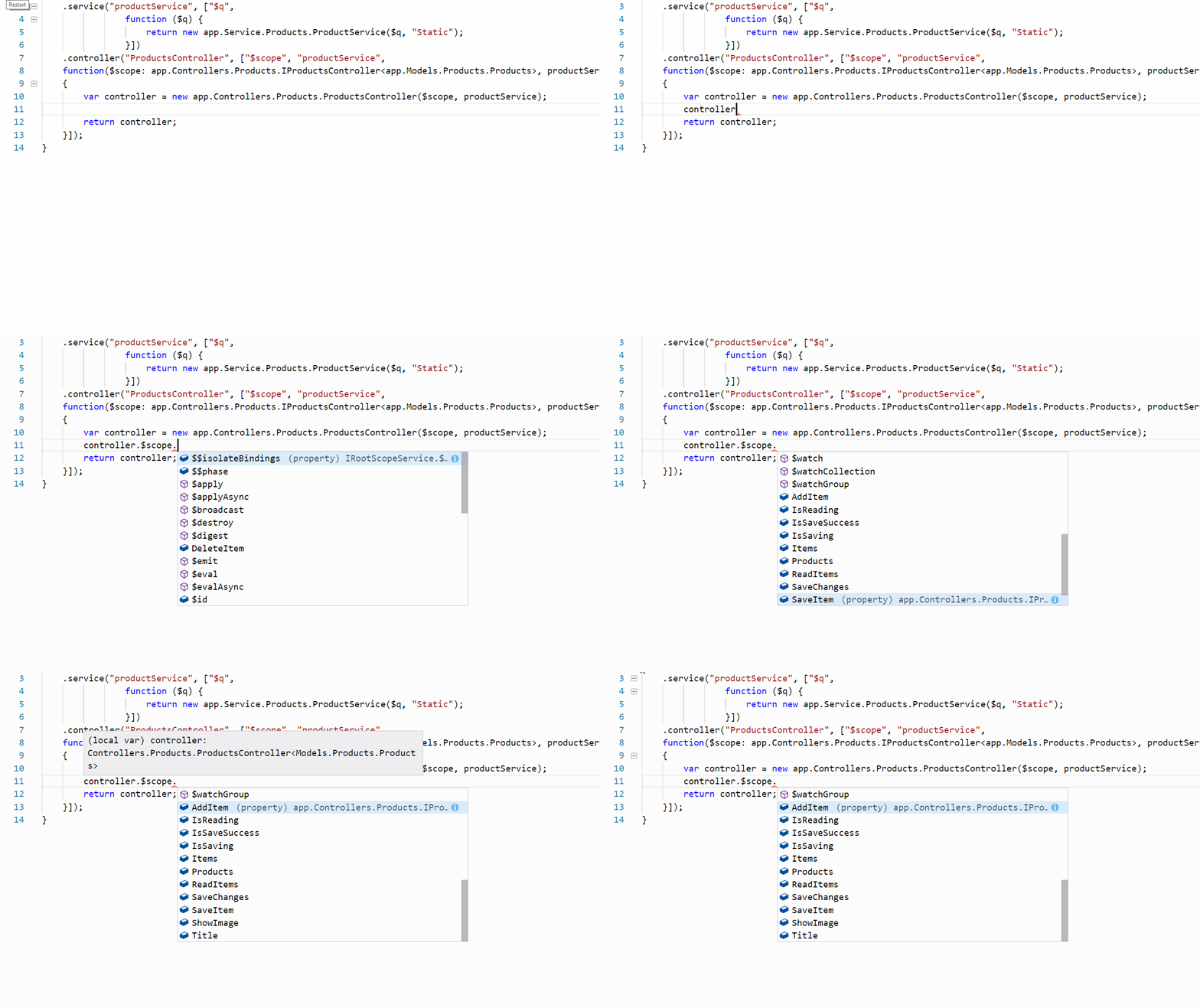
When you look at the controller code, it takes the instance of the product service and $scope as instance of app.Controllers.Products.IProductsController, as IProductsController extends ng.IScope AngularJS will compile without any issues and the important one to understand is that developers will get nice intellisense with the methods defined in IProductsController interface.

controller_intellisence_steps

Developing Controllers – ProductsController

In this part we at going to see how we can create AngularJS Controllers for the Product. This controller will use the ProductsModel that we created in the earlier article and also the product service. The products controller will not initialize the product service but an instance will be passed using AngularJS dependency injection. So lets start with ProductsController

When we develop AngularJS application we usually use the $scope for declaring methods, properties etc. As $scope dynamically creates properties and methods at run-time you will notice the errors only at the run-time. To avoid this discrepancy if you look at the AngularJS definition file for TypeScript you will find a interface called ng.IScope, this interface has the base for AngularJS $scope. If you look further in to the definition file you will notice that $rootScope is ng.RootScopeService and ng.IScope extends ng.IRootScopeService.

The following is the class diagram of the classes and interfaces involved and a short note below provides a short description about it

ControllerDiagram

Now lets see how we can use the ng.IScope for Products Controller class. I am going to create a Interface named IProductsController and this interface will extend ng.IScope. The interface definition will belike this

export interface IProductsController&lt;T extends Models.Products.Products&gt;
extends ng.IScope

In the IProductsController interface I have defined the following methods and properties.

Name Type Description
Title: string Property Gets or sets value indicating the name of the controller
Products: Array Property Gets or sets value indicating the the array of products.
IsReading: boolean Property Gets or sets value indicating whether the Products array is getting retrieved from products service or not.
IsSaving: boolean Property Gets or sets value indicating whether the items in the Products array is getting saved using products service or not.
IsSaveSuccess: boolean Property Denotes the flag indicating whether the success or failure of a call to any ProductService operation.
ReadItems:() Method Method used to read products list from product service.
SaveItem: (T:Product) Method Method used to save an individual item in the products list using Product Service.
SaveChanges: () Method Method used to save the Products array that are modified using ProductsService.
DeleteItem: (T:Product) Method Method used to delete a specific product from the Products array using ProductService.
AddItem: (T:Product) Method Method used to add a new product to the Products array using ProductService.
This is a sample code and some methods and properties might be contradictory.

The IProdcutController interface full definition with methods and properties is given below

export interface IProductsController&lt;T extends Models.Products.Products&gt; extends ng.IScope
{
    Title: string;
    ShowImage: boolean;
    Products: Array&lt;T&gt;;
    Items: Array&lt;T&gt;;
    ReadItems: () =&gt; void;
    SaveItem: (T) =&gt; void;
    SaveChanges: () =&gt; void;
    DeleteItem: (T) =&gt; void;
    AddItem: (T) =&gt; void;
    IsReading: boolean;
    IsSaving: boolean;
    IsSaveSuccess: boolean;
}

Now lets see the implementation for ProductsController, the important one to understand here is the constructor, I have highlighted the constructor parameter in bold that indicates the instance of the IProductsController that will be passed while creating a instance of the ProductController in App.ts class. I will explain about it more in detail on the next part.

export class ProductsController&lt;T extends Models.Products.Products&gt;{
    static $inject = [&quot;$scope&quot;, &quot;productService&quot;];
    private _title:string = &quot;&quot;;
    private _showImage:boolean;
    private _products: Array&lt;T&gt;;
    private _service: app.Service.Products.ProductService;

    constructor(public $scope: IProductsController&lt;T&gt;, public productService: app.Service.Products.ProductService){
        this._service = productService;
        this.SetStatus(false, false);
        $scope.ReadItems = () =&gt; { this.ReadAllProducts(); };
        $scope.SaveItem = (T) =&gt; { this.SaveProduct(T); };
        $scope.SaveChanges = () =&gt; { this.SaveProducts(); };
        $scope.AddItem = (T) =&gt; {this.AddProduct(T);};
        $scope.DeleteItem = (T) =&gt; {this.DeleteProduct(T);};
        $scope.Items = new Array&lt;T&gt;();
        $scope.Products = new Array&lt;T&gt;();
        $scope.Title = &quot;ProductsController&quot;;
        $scope.IsSaveSuccess = true;
        $scope.ShowImage = false;
        this.ReadAllProducts();
    }

    private ReadAllProducts() : void {
        this.SetStatus(true, false);
        this._service.Repository.GetAll().then((productCollection)=&gt;{
        this.$scope.Items = productCollection as Array&lt;T&gt;;
        this.$scope.Products = productCollection as Array&lt;T&gt;;
        this.$scope.IsReading = false;
        });
    }

    private SaveProduct(itemToSave: T) : void {
        this.SetStatus(false, true);
        this.$scope.IsSaveSuccess = false;
        this._service.Repository.SaveItem(itemToSave).then((resultFlag)=&gt; { this.$scope.IsSaveSuccess = resultFlag; });
        this.SetStatus(false, false);
    }

    private SaveProducts() : void {
        this.SetStatus(false, true);
        this.$scope.IsSaveSuccess = false;
        this._service.Repository.SaveItems(this.$scope.Items).then((resultFlag)=&gt; { this.$scope.IsSaveSuccess = resultFlag; });
        this.SetStatus(false, this.$scope.IsSaveSuccess);
    }

    private AddProduct(itemToAdd: T): void{
        this.SetStatus(false, true);
        this.$scope.IsSaveSuccess = false;
        this._service.Repository.AddItem(itemToAdd).then((resultFlag)=&gt; { this.$scope.IsSaveSuccess = resultFlag; });
    }

    private DeleteProduct(itemToDelete: T){
        this.SetStatus(false, true);
        this.$scope.IsSaveSuccess = false;
        this._service.Repository.DeleteItem(itemToDelete).then((resultFlag)=&gt; { this.$scope.IsSaveSuccess = resultFlag; });
    }

    private SetStatus(isReading: boolean, IsSaving: boolean){
        this.$scope.IsReading = isReading;
        this.$scope.IsSaving = IsSaving;
    }
}

Creating Services with AngularJS

In this blog, we are going to see how to create a AngularJS service that will make use of the $q service for performing asynchronous processing. The $q service of AngularJS. You can find the $q documentation here. I have used TypeScript for scripting the classes as its been a blessing for a C# developers like me.

The scenario for this service will be, Products Service will call an external business service to get the data. The business service is developed by an external team which is not ready during the UI development. I hope most of us might have encountered such scenario and one of the ways to deal with such scenarios is to create a stub. I am going to use Repository Pattern that will intern call static or service repository based on condition.

The following is the class diagram of the classes and interfaces involved and a short note below provides a short description about it

UMLDiagram1

Repository pattern for getting data from service or static repository

IRepositoryManagerBase:

This interface provides the implementation for creating a repository manager class. This is a generic interface the takes any type as the parameter. The method GetRepository will be used to load the repositories based on the criteria passed. Will explain more about it in ProductsRepositoryManager class.

export interface IRepositoryManagerBase
{
    GetRepository(repositoryType: string): IRepository;
    RepositoryType: string;
    Repository: IRepository;
}

IRepository:

Interface used to provide CRUD operation on repository classes like GetAll, GetbyId, SaveItem, DeleteItem, AddItem, DeleteAll, SaveItems, AddItems and DeleteItems. The important one to understand here is that all the method returns promise.

export interface IRepository{
    GetAll(): ng.IPromise&lt;Array&gt;;
    GetbyId(id: number): ng.IPromise;
    SaveItem(item: TEntity): ng.IPromise;
    DeleteItem(item: TEntity): ng.IPromise;
    AddItem(item: TEntity): ng.IPromise;
    DeleteAll(): ng.IPromise;
    SaveItems(items: Array): ng.IPromise;
    AddItems(items: Array): ng.IPromise;
    DeleteItems(items: Array): ng.IPromise;
}

IProductRepository:

This interface extends the IRepository interface and has specialization method specific to Product

export interface IProductRepository extends IRepository{
    GetByName(name: string): ng.IPromise&lt;Array&gt;;
    GetByCode(code: string): ng.IPromise&lt;Array&gt;;
    GetByCategory(category: string): ng.IPromise&lt;Array&gt;;
}

Handling Asynchronous calls with AngularJS $q service

ProductServiceRepository:

This repository class extends IProductRepository interface that used to get the data from an external service and as of now I will give the skeleton of how to implement the deferred pattern all the methods. This can be considered as a boilerplate code and can used in any AngularJS.

export class ProductServiceRepository implements IProductRepository&lt;Models.Products.Products&gt;{
    static $inject = [&quot;$q&quot;];
    constructor(private $q: ng.IQService) {
    }
    public GetAll(): ng.IPromise&lt;Array&lt;Models.Products.Products&gt;&gt;{
        var d = this.$q.defer();
        try {
            // Call to external service here
            d.resolve();
        }
        catch (e) {
            // Code to get the error from service here
            d.reject(e);
        }
        return d.promise;
    }

    public GetbyId(id: number): ng.IPromise&lt;Models.Products.Products&gt;{
        var d = this.$q.defer();
        try {
            // Call to external service here
            d.resolve();
        }
        catch (e) {
            // Code to get the error from service here
            d.reject(e);
        }
        return d.promise;
    }

    public GetByName(name: string): ng.IPromise&lt;Array&lt;Models.Products.Products&gt;&gt;{
        var d = this.$q.defer();
        try {
            // Call to external service here
            d.resolve();
        }
        catch (e) {
            // Code to get the error from service here
            d.reject(e);
        }
        return d.promise;
    }

    public GetByCode(code: string): ng.IPromise&lt;Array&lt;Models.Products.Products&gt;&gt;{
        var d = this.$q.defer();
        try {
            // Call to external service here
            d.resolve();
        }
        catch (e) {
            // Code to get the error from service here
            d.reject(e);
        }
        return d.promise;
    }

    public GetByCategory(category: string): ng.IPromise&lt;Array&lt;Models.Products.Products&gt;&gt;{
        var d = this.$q.defer();
        try {
            // Call to external service here
            d.resolve();
        }
        catch (e) {
            // Code to get the error from service here
            d.reject(e);
        }
        return d.promise;
    }

    public SaveItem(item: Models.Products.Products): ng.IPromise&lt;boolean&gt;{
        var d = this.$q.defer();
        try {
            // Call to external service here
            d.resolve();
        }
        catch (e) {
            // Code to get the error from service here
            d.reject(e);
        }
        return d.promise;
    }

    public DeleteItem(item: Models.Products.Products): ng.IPromise&lt;boolean&gt;{
        var d = this.$q.defer();
        try {
            // Call to external service here
            d.resolve();
        }
        catch (e) {
            // Code to get the error from service here
            d.reject(e);
        }
        return d.promise;
    }

    public AddItem(item: Models.Products.Products): ng.IPromise&lt;boolean&gt;{
        var d = this.$q.defer();
        try {
            // Call to external service here
            d.resolve();
        }
        catch (e) {
            // Code to get the error from service here
            d.reject(e);
        }

        return d.promise;
    }

    public DeleteAll(): ng.IPromise&lt;boolean&gt;{
        var d = this.$q.defer();
        try {
            // Call to external service here
            d.resolve();
        }
        catch (e) {
            // Code to get the error from service here
            d.reject(e);
        }
        return d.promise;
    }

    public SaveItems(item: Array&lt;Models.Products.Products&gt;): ng.IPromise&lt;boolean&gt;{
        var d = this.$q.defer();
        try {
            // Call to external service here
            d.resolve();
        }
        catch (e) {
            // Code to get the error from service here
            d.reject(e);
        }
        return d.promise;
    }

    public AddItems(item: Array&lt;Models.Products.Products&gt;): ng.IPromise&lt;boolean&gt;{
        var d = this.$q.defer();
        try {
            // Call to external service here
            d.resolve();
        }
        catch (e) {
            // Code to get the error from service here
            d.reject(e);
        }
        return d.promise;
    }

    public DeleteItems(item: Array&lt;Models.Products.Products&gt;): ng.IPromise&lt;boolean&gt;{
        var d = this.$q.defer();
        try {
            // Call to external service here
            d.resolve();
        }
        catch (e) {
            // Code to get the error from service here
            d.reject(e);
        }
        return d.promise;
    }
}

ProductStaticRepository:

This repository class extends IProductRepository interface that used to populate the required inside very method and store in a collection. This method also uses deferred pattern all the methods. This method will come handy until the Business Service is made ready.

export class ProductStaticRepository implements IProductRepository&lt;Models.Products.Products&gt;{
    static $inject = [&quot;$q&quot;];
    private result: Array&lt;Models.Products.Products&gt; = new Array&lt;Models.Products.Products&gt;();
    constructor(private $q: ng.IQService) {
    }

    public GetAll(): ng.IPromise&lt;Array&lt;Models.Products.Products&gt;&gt;{
        var d = this.$q.defer();
        try {
            this.result = new Array&lt;Models.Products.Products&gt;();
            for(var counter:number = 0; counter &lt; 10; counter++){
                var item = new Models.Products.Products(
                    counter + 1,
                    &quot;ProductName &quot; + (counter+1).toString(),
                    &quot;PROD&quot; + (counter+1).toString(),
                    new Date(),
                    &quot;Product&quot; + (counter+1).toString() + &quot;-Description&quot;,
                    (counter+1)*1000,
                    &quot;ImageUrl00&quot;+ (counter+1).toString(), (counter%2 == 0) ? &quot;Toys&quot;: &quot;Books&quot;);
                this.result.push(item);
            }
            d.resolve(this.result);
        }
        catch (e) {
            d.reject(e);
        }

        return d.promise;
    }

    public GetbyId(id: number): ng.IPromise&lt;Models.Products.Products&gt;{
        var d = this.$q.defer();
        var result: Models.Products.Products;
        try {
            for(var item in this.result){
                result = this.result[item];
                if(result.ProductId == id)
                {
                    break;
                }
            }

            d.resolve(result);
        }
        catch (e) {
            d.reject(e);
        }

        return d.promise;
    }

    public GetByName(name: string): ng.IPromise&lt;Array&lt;Models.Products.Products&gt;&gt;{
        var d = this.$q.defer();
        var results: Array&lt;Models.Products.Products&gt;;
        try {
            var currentitem: Models.Products.Products;
            for(var item in this.result){
                currentitem = this.result[item];
                if(currentitem.ProductName == name)
                {
                    results.push(currentitem);
                }
            }

            d.resolve(results);
        }
        catch (e) {
            d.reject(e);
        }

        return d.promise;
    }

    public GetByCode(code: string): ng.IPromise&lt;Array&lt;Models.Products.Products&gt;&gt;{
        var d = this.$q.defer();
        var results: Array&lt;Models.Products.Products&gt;;
        try {
            var currentitem: Models.Products.Products;
            for(var item in this.result){
                currentitem = this.result[item];
                if(currentitem.ProductCode == code)
                {
                    results.push(currentitem);
                }
            }

            d.resolve(results);
        }
        catch (e) {
            d.reject(e);
        }

        return d.promise;
    }

    public GetByCategory(category: string): ng.IPromise&lt;Models.Products.Products[]&gt;{
        var d = this.$q.defer();
        var results: Array&lt;Models.Products.Products&gt;;
        try {
            var currentitem: Models.Products.Products;
            for(var item in this.result){
                currentitem = this.result[item];
                if(currentitem.ProductCategory == category)
                {
                    results.push(currentitem);
                }
            }

            d.resolve(results);
        }
        catch (e) {
            // $.Deferred&lt;Models.Products.Products[]&gt;().reject(e);
            d.reject(e);
        }

        return d.promise;
    }

    public SaveItem(item: Models.Products.Products): ng.IPromise&lt;boolean&gt;{
        ...
    }

    public DeleteItem(item: Models.Products.Products): ng.IPromise&lt;boolean&gt;{
            ...
    }

    public AddItem(item: Models.Products.Products): ng.IPromise&lt;boolean&gt;{
            ...
    }

    public DeleteAll(): ng.IPromise&lt;boolean&gt;{
            ...
    }

    public SaveItems(item: Array&lt;Models.Products.Products&gt;): ng.IPromise&lt;boolean&gt;{
            ...
    }

    public AddItems(item: Array&lt;Models.Products.Products&gt;): ng.IPromise&lt;boolean&gt;{
            ...
    }

    public DeleteItems(item: Array&lt;Models.Products.Products&gt;): ng.IPromise&lt;boolean&gt;{
            ...
    }
}

ProductRepositoryManager:

This class is repository manager class that provides the repository class based on the string parameter passed to the GetRepository(repositoryType: string). If the parameter is passed as “Static” then an instance of ProductStaticRepository is returned or when “Service” is passed as parameter then ProductServiceRepository is returned.

export class ProductRepositoryManager implements IRepositoryManagerBase&lt;Models.Products.Products&gt;{
    private repoType: string;
    private _repository: IRepository&lt;Models.Products.Products&gt;;
    constructor(repositoryType: string, private $q: ng.IQService){
        this.repoType = repositoryType;
        this._repository = this.GetRepository(this.repoType);
    }

    public GetRepository(repositoryType: string) : IRepository&lt;Models.Products.Products&gt;{
        this.repoType = repositoryType;
        var itemToReturn:IRepository&lt;Models.Products.Products&gt;;
        switch(repositoryType){
            case &quot;Static&quot;:
                itemToReturn = new ProductStaticRepository(this.$q);
                break;
            case &quot;Service&quot;:
                itemToReturn = new ProductServiceRepository(this.$q);
                break;
            case &quot;Others&quot;:
            default:
                itemToReturn = null;
                break;
        }
        return itemToReturn;
    }

    public get Repository(): IRepository&lt;Models.Products.Products&gt;{
        return this._repository;
    }

    public get RepositoryType(): string{
        return this.repoType;
    }

    public set RepositoryType(value: string){
        this.repoType = value;
    }
}

Product Service

This is the AngularJS service that is derived from the IRepositoryManagerBase class and this will create an instance of ProductServiceRepository/ProductStaticRepository repository class based on the criteria. Some important explanation on the implementation in the ProductService is given below

export class ProductService extends ProductRepositoryManager{
    static $inject = [&quot;$q&quot;];
    constructor($q: ng.IQService, repoType: string){
        super(repoType, $q);
    }
}

Adventure with Typescript and AngularJS

Typescript was introduced on 2012 and I was working on it from 2013 since then I was been a biggest admirer of it and have developed numerous HTML applications with TypeScript. In this blog I am not going to touch on fundamentals but a little more advanced topic. One an find the Type Script fundamentals here.

In the coming blogs, I am going to explain how we can create MVC using TypeScript and how we can able to use it in out HTML pages along with AngularJS. Most of plumbing I have done using AngularJS services

I am going to split up the blog in to sub sections as follows

I have used Visual Studio Code for development but you can also use TypeScript playground for generating JavaScript as well with the sample code attached with the blog. Developing applications with TypeScript using VSCode can be found @TypeScript Programming with Visual Studio Code.

So let’s start ……..

Developing Model using Typescript

So now lets create a Model class using TypeScript. I am going to create a Products class and going to have some properties to it. This will used in the controller to bind the values retrieved from service and display it in HTML page. The following class diagram depicts the methods and properties of the Products class and the TypeScritp code is given below.

ModelDiagram

module app.Models.Products{
    export class Products{
        private _productId: number = 0;
        private _productName: string = "";
        private _productCode: string = "";
        private _releaseDate: Date = new Date(2016, 3, 25);
        private _productDescription: string;
        private _price: number;
        private _imageUrl:string;
        private _productCategory:string;

        constructor(id: number, name: string,
        code: string, releaseDate: Date,
        description: string, price: number,
        imageUrl: string, category: string){
            this._productId = id;
            this._productName = name;
            this._productCode = code;
            this._releaseDate = releaseDate;
            this._productDescription = description;
            this._price = price;
            this._imageUrl = imageUrl;
            this._productCategory = category;
        }

        public get Price(): number
        {
            return this._price;
        }

        public set Price(value: number)
        {
             this._price = value;
        }

        public get ProductId(): number
        {
            return this._productId;
        }

        public set ProductId(value: number)
        {
             this._productId = value;
        }

        public get ProductName(): string
        {
            return this._productName;
        }

        public set ProductName(value: string)
        {
             this._productName = value;
        }

        public get ProductCode(): string
        {
            return this._productCode;
        }

        public set ProductCode(value: string)
        {
             this._productCode = value;
        }

        public get Description(): string
        {
            return this._productDescription;
        }

        public set Description(value: string)
        {
             this._productDescription = value;
        }

        public get ReleaseDate(): Date
        {
            return this._releaseDate;
        }

        public set ReleaseDate(value: Date)
        {
             this._releaseDate = value;
        }

        public get ImageUrl(): string
        {
            return this._imageUrl;
        }

        public set ImageUrl(value: string)
        {
             this._imageUrl = value;
        }

        public get ProductCategory(): string
        {
            return this._productCategory;
        }

        public set ProductCategory(value: string)
        {
             this._productCategory = value;
        }

    }
}


Every Journey has a beginning….

I have been into Microsoft Technology for more that 13+ years and had a wonderful journey until now. I have been blessed for working with some of the great minds in the industry and has been a excellent journey so far.

There are quiet few reasons that I see blogging can improve me in the following ways

  • Sharing my knowledge to the global audience and improvising it based on their feedback
  • To gain more confidence in myself on my technical capabilities and new things that I explore
  • Learn by contributing

Well nothing more I can think of as of now. I am happy that I an starting this journey and looking into attracting global developer community….